The Special Ed AI Blueprint • practical implementation kit for special educators
v1.1 — Updated March 2026
No app. No login. No student data in a third-party platform.
12 ready-to-use prompts for IEP writing, goals, and parent communication — designed to run with de-identified inputs through tools you already use. Your data stays yours.
$20 one-time • lifetime access
Works with ChatGPT, Claude, or Gemini — no account, no app, no student data leaving your control.
The problem
The workload is real. The advice usually isn't.
Special educators do not need another glossy lecture about the future of AI. They need a practical way to reduce blank-page time, move faster through repeat documentation work, and keep professional judgment fully intact.
Blank-page time burns planning periods before the real work even starts.
Documentation drag keeps spilling into evenings, weekends, and already-thin energy.
Most “AI for teachers” advice stays abstract when you need usable language this week.
What's inside
A working kit, not a pile of ideas.
Four components arranged to match the book's flow: the Prompt Vault first, then the Foundation Protocol, followed by the 2026 Teacher Stack, and finally the implementation map and guardrails that help educators move from draft to review without losing professional judgment.
Prompt Vault
The first section of the kit: 12 variable-driven prompts for present levels, goals, parent communication, meeting prep, progress notes, and follow-up drafting.
Foundation Protocol
A fast-start workflow that helps an educator use one prompt on one live task and walk away with a usable draft in the very first session.
2026 Teacher Stack
A plain-English tool map for capture, tracking, drafting, calendar workflow, secure storage, and AI drafting — without brittle automations.
Implementation Map + Guardrails
A practical system for moving from capture to review with clear reminders that AI drafts while the teacher reviews, verifies, edits, and decides.
Sample output preview
See the kind of cleaner draft language this kit helps unlock.
Buyers are not purchasing hype. They are buying a faster path from rough notes to usable draft language they can review, verify, and refine inside their real workflow.
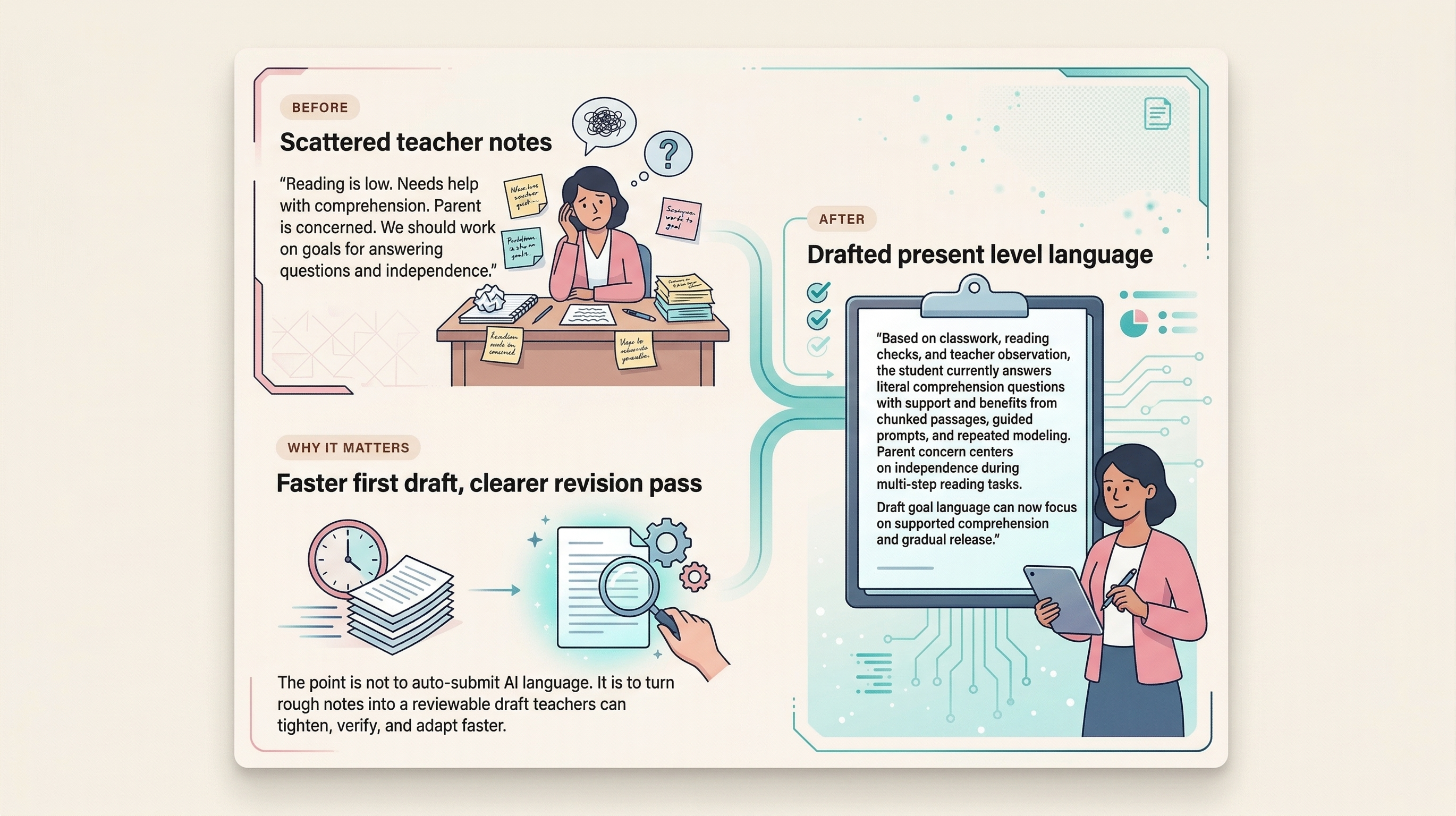
Scattered teacher notes
“Reading is low. Needs help with comprehension. Parent is concerned. We should work on goals for answering questions and independence.”
Drafted present level language
“Based on classwork, reading checks, and teacher observation, the student currently answers literal comprehension questions with support and benefits from chunked passages, guided prompts, and repeated modeling. Parent concern centers on independence during multi-step reading tasks. Draft goal language can now focus on supported comprehension and gradual release.”
Faster first draft, clearer revision pass
The point is not to auto-submit AI language. It is to turn rough notes into a reviewable draft teachers can tighten, verify, and adapt faster.
What this helps with
Less drag. Better drafts. A cleaner starting system.
The promise is practical: reduce documentation friction, speed up first drafts, and create a repeatable workflow teachers can actually maintain.
- Less blank-page friction when writing PLPs, goals, and parent communication
- A cleaner workflow for drafting, reviewing, and saving work in approved systems
- A realistic first-win path for teachers who need traction, not a full rollout project
Who it's for
Built for teachers doing the work, not people chasing one-click automation.
Best fit
- Special education teachers and case managers buried in IEP writing and documentation load
- Educators who want cleaner first drafts without handing decisions to a tool
- Teams who need a practical starting system instead of a giant implementation project
FAQ
Questions worth answering before you buy.
Is this an AI tool or software platform?
No. It is a practical implementation kit: prompts, workflow guidance, a teacher stack, and a first-win protocol you can run with common AI tools like ChatGPT, Claude, or Gemini.
Does this replace educator judgment or guarantee compliance?
No. The positioning is explicitly human-in-the-loop. The product helps produce cleaner drafts faster, but teachers still review, verify, edit, and follow district policy.
Who is this best for?
Special education teachers, case managers, and related staff who write real documentation and want less blank-page time, less admin drag, and more usable output this week.
What kind of result should buyers expect?
The promise is not magic automation. It is a faster path to usable draft language, a clearer workflow, and a real first win during an actual planning period.
What is this not promising?
It is not legal advice, not a district-wide compliance guarantee, and not a one-click IEP generator. The Blueprint is designed to help educators produce cleaner first drafts faster while keeping review, verification, and final judgment with the teacher.
The Special Ed AI Blueprint
Start with one prompt. Finish with a usable draft.
The Special Ed AI Blueprint gives you 12 ready-to-use prompts, a mapped 2026 teacher stack, and a Foundation Protocol designed to produce one real, reviewable draft in your next free period — not after a weekend of setup. AI handles the blank page. You handle the judgment call.
- 12 ready-to-use prompts for high-friction documentation tasks
- The 2026 Teacher Stack so buyers know what to use and what to ignore
- The Foundation Protocol for one practical win in the next planning period
Release edition
The Special Ed AI Blueprint
A practical AI implementation kit for special education teachers, case managers, and resource specialists who need usable output this week.
Release edition · PDF guide + prompt vault · v1.1 updated March 2026